How can I find someone on Telegram

If you’re new to Telegram or simply want to connect with more people, you might wonder how to find someone quickly and easily. Telegram’s privacy-focused design can make user discovery a bit different than other messaging apps, but there are still several effective ways to locate and contact friends, family, colleagues, or even potential business connections on this platform.
Below, we’ll walk you through the best methods to find someone on Telegram, including step-by-step instructions and tips. By following these strategies, you’ll be able to enhance your network and make the most of what Telegram has to offer.
Understanding Telegram user search
Telegram allows you to search for users in a couple of ways. Unlike other messaging services, it doesn’t rely solely on phone numbers, giving you greater flexibility when searching. Here are the most common methods.
Searching by username

- Open Telegram: Launch the Telegram app on your mobile device or desktop.
- Tap the search bar: In the top-right corner (on mobile) or top-left corner (on desktop), you’ll see a search icon.
- Type the username: Enter the exact username (for example,
@username). Telegram will show you matching results if that username exists. - Select the correct profile: Tap on the correct person from the search results and open the chat.
If the user has set a unique Telegram username, this is usually the fastest way to find them.
Searching by phone number
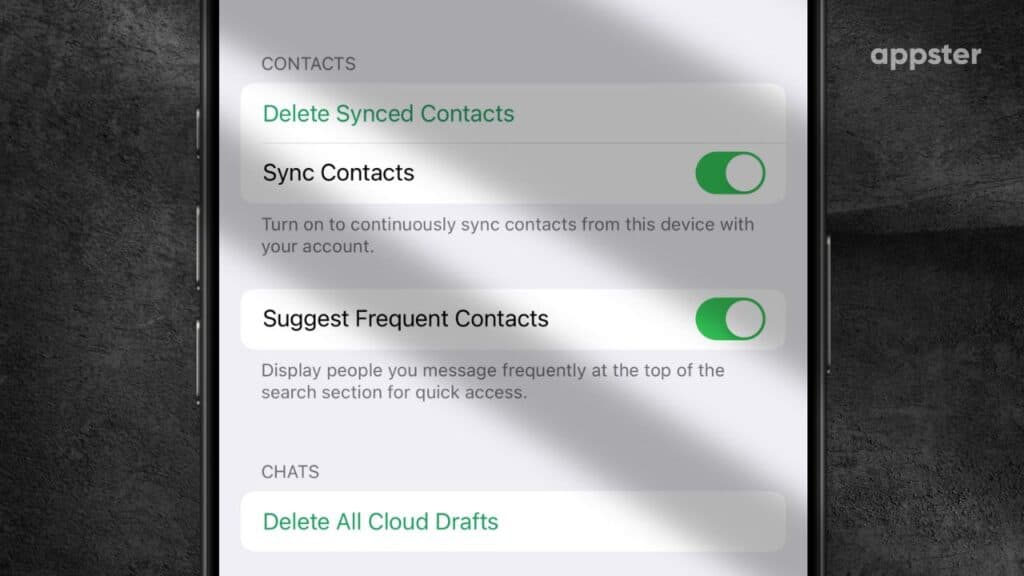
- Sync your contacts: Before you start, ensure your phone’s contact list is synced with Telegram. You can do this by going to Settings > Privacy and Security > Sync Contacts.
- Open contacts: From the Telegram menu, select Contacts.
- View synced list: If the person’s phone number is saved on your device and they use Telegram, they’ll appear here.
- Tap their name: Start a chat directly from the contact list.
This method is useful for friends and family whose phone numbers you already have.
Using advanced search filters

Besides usernames and phone numbers, Telegram also has advanced search features that let you filter by chats, media, and more.
- Open the search bar: Locate the search icon in your Telegram app.
- Type a keyword or name: Enter the person’s name or any unique keyword.
- Use filters: If you have a busy chat history, you can narrow results by selecting Chats, Media, or Links tabs.
While this is more helpful for finding past conversations, it can come in handy when searching for specific chat content.
Alternative ways to find someone on Telegram
Using Telegram groups and channels
If you know which Telegram group or channel the person might be a part of, you can look through the group member list or channel discussion section (if available).
- Join the group or channel: You might need an invite link or you can search public groups by keywords.
- Check member list: Tap on the group’s name and scroll through the participant list.
- Initiate a private chat: If privacy settings allow, you can message the individual directly.
Asking for their username or invite link
Some users prefer to keep their phone numbers private, so the best way to find them is by asking for their username or a custom invite link. Once you have that link, just open it on your device, and Telegram will automatically direct you to their profile.
Tips for efficient searching
- Be exact with spelling: Telegram’s search feature is case-insensitive, but getting the spelling correct matters for usernames.
- Look for unique identifiers: If the person’s name is very common, you’ll need their exact username or phone number.
- Secure your own username: If you plan on receiving friend requests via username, consider customizing it in Settings.
- Respect privacy: Always ensure you’re not invading someone’s privacy and obtain permission before adding them via phone number.
Finding someone on Telegram can be as simple as searching their username or syncing your phone contacts. While Telegram emphasizes privacy, it still provides convenient ways to connect with the people you care about. By following the tips in this guide, you’ll be well on your way to forming new connections and engaging in meaningful conversations.