How to remove yourself from a group text
Group texts can be handy for staying in touch with friends, family, and co-workers—until they get out of control. Maybe you have to endure endless notifications or irrelevant chatter. Whatever the case, learning how to remove yourself from a group text can save your sanity. This article will walk you through the steps for both iPhone and Android, discuss alternatives if you can’t leave directly, and address frequently asked questions.
Why leave a group text?
Staying in a group message can sometimes be more trouble than it’s worth. Here are a few common reasons why people want out:
- Constant notifications from a busy group
- Irrelevant messages that don’t concern you
- Annoying spam or marketing group texts
- Privacy concerns regarding unknown members
If you’re experiencing any of these, it’s time to consider removing yourself from the group text to ensure your peace of mind.
How to leave a group text on iPhone
1. Check group compatibility
On Apple devices, you can only remove yourself from an iMessage group if all participants use iPhones. If someone in the group has an Android phone, the messages are sent via MMS or SMS, which limits this feature.
2. Open the conversation
Launch the Messages app and navigate to the group conversation you want to exit.
3. Tap the group icon
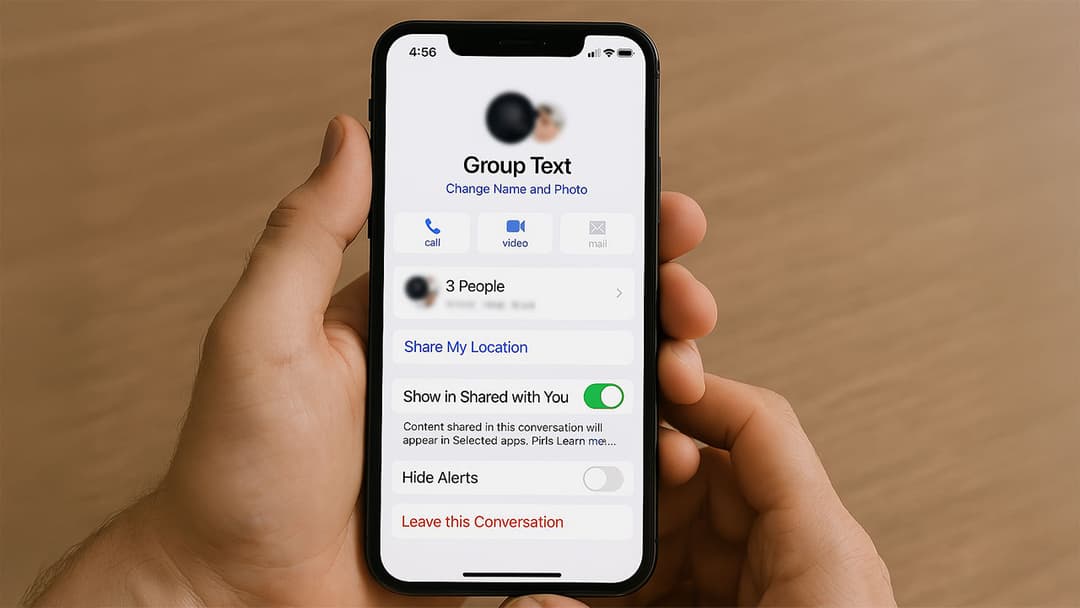
At the top of the screen, you’ll see a group icon or the profile pictures of the participants. Tap on this to access the info menu.
4. Tap ‘Leave this Conversation’
Scroll to the bottom, where you’ll see the red Leave this Conversation option. Tap it, then confirm your choice. After you confirm, you’ll no longer receive notifications or messages from that group.
If you do not see the ‘Leave this Conversation’ option, it’s likely because the group contains a non-iPhone user. In this case, you cannot remove yourself directly.
How to remove yourself from a group text on Android
Android devices don’t offer a straightforward “leave” option if the group text is using standard MMS. However, there are some workarounds:
1. Mute the conversation
- Open the default Messages app.
- Long-press the group conversation you want to mute.
- Tap the Notifications or Bell icon.
- Choose Silent or Turn off notifications.
Muting the group text allows you to avoid alerts, while still keeping the conversation if you need to revisit it later.
2. Block the group
If muting isn’t enough, and you need to stop receiving messages altogether:
- Open the group text.
- Tap the Menu (three-dot) icon at the top right.
- Select People & options or Details.
- Look for the Block or Stop option to end all messages from this group.
Blocking is more extreme than muting. You won’t see any messages from that group, and other participants might still view your phone number on their end.
3. Ask the group admin
In some messaging apps (like WhatsApp or Telegram), you can request an admin to remove you if the platform doesn’t provide a direct exit option for standard text. The admin can manually remove you from the group to stop messages.
Alternative steps when you can’t leave
- Ask the group to start a new message without you: Sometimes, the simplest solution is communication. If the group is made up of people you know, ask them to start a new group chat without your number.
- Migrate to a messaging app with group controls: Platforms like WhatsApp, Telegram, or Signal allow for easier group management. If everyone moves to a platform with straightforward exit options, you can easily remove yourself.
- Clear or delete the conversation: While not a permanent fix, clearing or deleting the conversation can reduce phone clutter. However, you’ll still receive new messages if you remain in the group.
Tips for managing future group texts
- Use do not disturb: Both iPhone and Android have features to mute or silence notifications from specific conversations.
- Respond politely: If you’re in a personal group, let people know you’d like fewer notifications or prefer to exit.
- Choose the right messaging platform: Not all messaging services allow you to fully remove yourself from a group, so use a platform that gives you more control.
By following these tips, you’ll know how to remove yourself from a group text or at least curb those pesky notifications. Whether you use an iPhone or Android, there’s a solution for everyone. Gain back control of your phone’s inbox and enjoy a more peaceful digital life.